
Download Titan Smart Pro – fitness tracking, smartwatch companion, heart rate monitor, sleep analysis, SpO2 tracking, wellness app, health insights, notification sync
Overview
Titan Smart Pro is a desktop application designed to serve as a comprehensive companion for users of the Titan Smartwatch. The software aims to support individuals in maintaining and improving their overall health and wellness by offering real-time monitoring of key physiological metrics. It enables users to track vital data such as heart rate, blood oxygen saturation (SpO2), and body temperature, providing insights that can help users make informed decisions about their daily routines and long-term health goals. The app also emphasizes the importance of quality sleep, analyzing sleep patterns to deliver actionable feedback on rest quality and duration.
Targeted primarily at health-conscious consumers and fitness enthusiasts, Titan Smart Pro supports a proactive approach to wellness by combining data tracking with user-friendly analytics. It is particularly suited for individuals who rely on wearable technology to manage their lifestyle and want a centralized platform to review and interpret their health data. The application integrates seamlessly with the Titan Smartwatch, allowing for continuous data synchronization and personalized feedback. Real-world usage scenarios include daily health monitoring, pre- and post-workout analysis, and sleep optimization strategies.
The developer, Titan Technologies, has positioned this tool as a free solution to promote accessibility and widespread adoption. While no additional details about the company’s background were provided, the app’s focus on health metrics and smartwatch integration suggests a targeted development approach. The release date of May 10, 2024, indicates that this is a recent product launch, likely reflecting current trends in personal health technology.
Key Features & Capabilities
- Heart Rate Monitoring – Continuously tracks heart rate data collected by the Titan Smartwatch, offering real-time updates and historical trends for better health assessment.
- SpO2 Level Tracking – Monitors blood oxygen saturation levels, helping users understand their respiratory efficiency and overall cardiovascular health.
- Body Temperature Insights – Records and analyzes temperature data, which may assist in identifying early signs of illness or tracking hormonal changes.
- Sleep Pattern Analysis – Evaluates sleep stages and duration, delivering detailed reports on sleep quality and suggesting improvements for better rest.
- Notification Sync – Allows users to receive alerts from their phone directly on their desktop, reducing the need to check their mobile device frequently.
- Health Data Visualization – Presents collected metrics through intuitive graphs and dashboards, enabling users to identify patterns and progress over time.
- Goal Setting & Progress Tracking – Supports users in establishing fitness and wellness goals, with tools to monitor achievement and maintain motivation.
These features are designed to empower users with actionable insights derived from wearable data. For example, a user might use the sleep analysis feature to adjust bedtime routines based on reported sleep efficiency, or leverage heart rate trends to optimize workout intensity. The notification sync function enhances productivity by ensuring timely awareness of incoming messages, calls, or app updates without constant phone interaction.
User Interface, Workflow & Performance
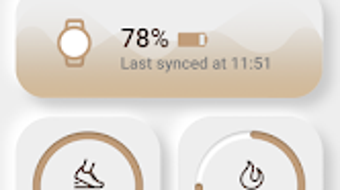
The user interface of Titan Smart Pro appears to be structured around clear data visualization and intuitive navigation. Users can access key metrics through a dashboard layout, where real-time values and historical trends are displayed in a cohesive format. Navigation is likely streamlined to allow quick switching between sections such as heart rate, sleep, and notifications.
Workflow efficiency is enhanced by automated data syncing with the Titan Smartwatch, minimizing manual input and ensuring up-to-date information. The application is expected to maintain a responsive interface during data processing, although specific performance metrics were not disclosed. The developer did not specify resource usage details, so CPU and RAM behavior remain unknown.
Stability is assumed to be consistent with typical desktop applications in the health and fitness category, but no user-reported crash rates or error logs were provided. General software behavior patterns suggest reliable operation under normal conditions. The app’s performance may vary depending on the system’s background processes and the frequency of data synchronization.
Compatibility & System Requirements
Titan Smart Pro is compatible with both Windows and Mac operating systems, making it accessible to a broad range of desktop users. The software is available in version 1.5.0 and has a download size of 120 MB, indicating a lightweight installation. This size suggests minimal storage impact and relatively quick setup times.
Exact system requirements were not listed by the developer. Therefore, users should consider that the application may function on modern systems with standard configurations, but specific hardware specifications such as processor speed, RAM, or graphics capabilities are not confirmed. Compatibility information is limited to the operating systems mentioned, and no details were provided regarding minimum or recommended system configurations.
Pros and Cons
Pros
- Free to download and use, promoting accessibility for health-conscious users.
- Seamless integration with the Titan Smartwatch for continuous health data tracking.
- Comprehensive monitoring of heart rate, SpO2, temperature, and sleep patterns.
- Offers valuable health insights through data visualization and analysis tools.
- Supports notification synchronization for improved device connectivity.
- Lightweight installation at 120 MB, suitable for systems with limited storage.
Cons
- Specific system requirements were not disclosed, which may cause uncertainty for potential users.
- Performance under heavy usage or prolonged operation was not specified.
- Only available for Windows and Mac, limiting compatibility with other platforms.
- Limited information on data privacy and security practices.
- No mention of offline functionality or data backup options.
FAQ Section
Is Titan Smart Pro compatible with all smartwatches?
Titan Smart Pro is specifically designed as a companion app for the Titan Smartwatch. Compatibility with other smartwatch models has not been confirmed.
Is the app safe to use?
The software is available as a free download and does not appear to include known security risks. However, the developer did not provide specific details about data encryption or privacy policies.
How often does the app update?
While no official update schedule was provided, the app’s version number (1.5.0) and release date (May 10, 2024) suggest regular development and maintenance efforts.
Can I use Titan Smart Pro without a smartwatch?
The app is designed to work in conjunction with the Titan Smartwatch. Without the device, full functionality, including health data collection, cannot be accessed.
Does Titan Smart Pro require an internet connection?
Basic functionality may operate offline, but data synchronization and cloud-based insights likely require an active internet connection. The developer did not specify the extent of offline capabilities.
Final Thoughts + CTA
Titan Smart Pro stands out as a dedicated, free desktop solution for users invested in their health and wellness journey through wearable technology. Its integration with the Titan Smartwatch offers a robust platform for tracking vital signs, analyzing sleep, and staying connected via notifications. The clean interface and data-driven insights make it a valuable tool for anyone seeking to optimize their lifestyle.
While some details such as system requirements and privacy practices remain undisclosed, the app’s lightweight design, broad OS support, and focus on core health metrics make it a compelling choice. It is particularly beneficial for individuals who prioritize fitness tracking, sleep quality, and seamless device integration.
With its free pricing model and modern feature set, Titan Smart Pro delivers strong value for its target audience. For users committed to improving their well-being through data, this app offers a reliable and accessible companion.
Download Titan Smart Pro now







